# Welcome to HeyMint Community Platform!

Welcome to HeyMint Community Platform! After operating our allowlist manager and Launchpad platform for over a year, we’ve identified a crucial challenge our users face: cultivating a highly engaged community. Simply launching an NFT collection doesn’t guarantee success; active support from vibrant communities on platforms like Twitter and Discord is essential.

To address this, we’re excited to introduce a powerful new tool: a Discord bot designed to boost engagement on Twitter, empowering your community members to actively promote your project while earning rewards.

### Key features

#### **1.**[ **Engagement and Rewards on Twitter**](/engagement-and-rewards-on-x)**:**

Encourage your community members on Discord to engage with your tweets. By liking and retweeting, they can earn points, which can later be redeemed for entry into raffles and exclusive giveaways.

<figure><img src="https://538078840-files.gitbook.io/~/files/v0/b/gitbook-x-prod.appspot.com/o/spaces%2FnvqLUUmCa9WvNAly8MkZ%2Fuploads%2F21U1AGuiHxGPozyKCxSk%2Fheymintbot.gif?alt=media&amp;token=28ae8007-1a40-4938-8e12-38b43bb5b6bc" alt=""><figcaption></figcaption></figure>

#### **2.** [**Seamless Giveaways**](https://app.gitbook.com/o/PuWjBdHmUGS105jxI6Tq/s/nvqLUUmCa9WvNAly8MkZ/~/changes/7/seamless-giveaways)

Our Discord bot simplifies the giveaway process. You can set up giveaways directly on Discord, allowing participants to enter without leaving the server, streamlining participation and engagement.

<figure><img src="https://538078840-files.gitbook.io/~/files/v0/b/gitbook-x-prod.appspot.com/o/spaces%2FnvqLUUmCa9WvNAly8MkZ%2Fuploads%2FftzlVvlZCOx0ws5jrQpu%2Fgiveaways.gif?alt=media&amp;token=9a7309e7-a64e-415b-bd28-4036851bacc4" alt=""><figcaption></figcaption></figure>

#### **3.** [**Integrated Token Gating**](https://app.gitbook.com/o/PuWjBdHmUGS105jxI6Tq/s/nvqLUUmCa9WvNAly8MkZ/~/changes/7/integrated-token-gating)

Forget about juggling multiple token-gating solutions. Our integrated approach means users authenticate once via HeyMint, simplifying access and security.

<figure><img src="https://538078840-files.gitbook.io/~/files/v0/b/gitbook-x-prod.appspot.com/o/spaces%2FnvqLUUmCa9WvNAly8MkZ%2Fuploads%2Fz5QpmchiH0D9ERL3BNhv%2Ftokengate.gif?alt=media&amp;token=8c39864d-38b9-4755-af7c-9c1061d44785" alt=""><figcaption></figcaption></figure>

### **Upcoming Features:**

#### User insights

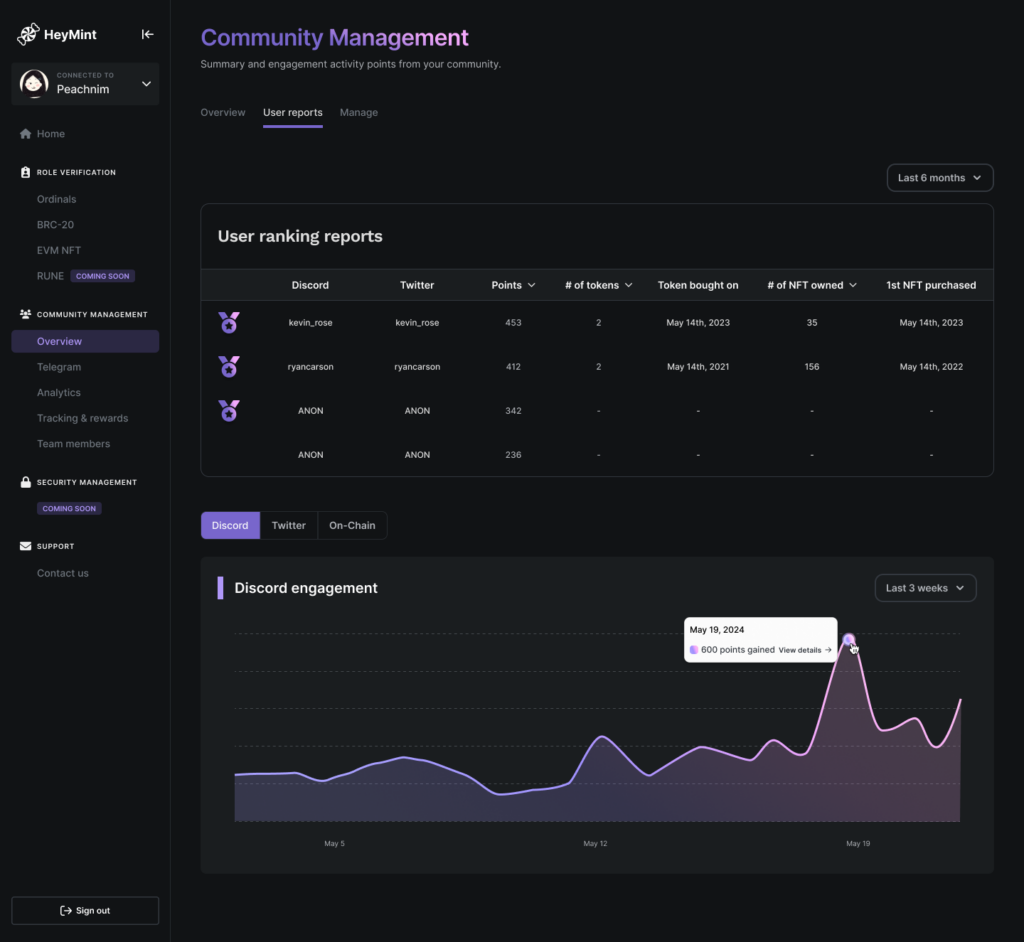
Gain valuable insights into user activities across platforms (Discord, Twitter, and on-chain). This feature will help you identify and reward the most active and loyal members of your community.

<figure><img src="https://538078840-files.gitbook.io/~/files/v0/b/gitbook-x-prod.appspot.com/o/spaces%2FnvqLUUmCa9WvNAly8MkZ%2Fuploads%2FWe6AdsogDZ3g8O4K7a0p%2Finsights.png?alt=media&amp;token=f24238d5-a43b-4ff1-972b-16567c6ec4ce" alt=""><figcaption></figcaption></figure>

#### **Enhanced Leveling System**

We’re enhancing our leveling system to encourage more meaningful interactions on Discord. The upcoming update will include quality controls, such as requiring reactions or replies to messages, to reduce spam and enhance engagement quality.

[Start now](https://community.heymint.xyz/) to get a-month free trial!&#x20;


# Setting up your allowlist

#### Step 1: Create your HeyMint Account

To get started, head to our [Allowlist Manager tool](https://heymint.xyz/creator/projects/new) and sign up for an account. You can sign up by connecting your Google account, Twitter, Discord or your existing Bitcoin, Solana, or EVM wallets.

<figure><img src="https://538078840-files.gitbook.io/~/files/v0/b/gitbook-x-prod.appspot.com/o/spaces%2FnvqLUUmCa9WvNAly8MkZ%2Fuploads%2FDtu4IN2xrwhNx1SMgQJe%2FScreenshot%202024-05-11%20at%204.26.29%E2%80%AFAM.png?alt=media&amp;token=95d38e55-ebbd-4b60-8ff7-04e1fced059d" alt=""><figcaption></figcaption></figure>

**Step 2: Create a new allowlist**

Once you're signed in, you can start creating a new allowlist by filling out your allowlist's basic information and then clicking on the Save button at the bottom of the page.

<figure><img src="https://538078840-files.gitbook.io/~/files/v0/b/gitbook-x-prod.appspot.com/o/spaces%2FnvqLUUmCa9WvNAly8MkZ%2Fuploads%2Fe826yAlHVB1NmeW2jIYu%2FScreenshot%202024-05-11%20at%207.00.19%E2%80%AFAM.png?alt=media&amp;token=58a505b6-1733-4c54-aee6-5f27347c9130" alt=""><figcaption></figcaption></figure>

<figure><img src="https://538078840-files.gitbook.io/~/files/v0/b/gitbook-x-prod.appspot.com/o/spaces%2FnvqLUUmCa9WvNAly8MkZ%2Fuploads%2FdFAm8bof6IqDXBNYw9ML%2FScreenshot%202024-05-11%20at%207.03.28%E2%80%AFAM.png?alt=media&amp;token=3b0f176d-95f5-4ab9-8087-8c384111fd7e" alt=""><figcaption></figcaption></figure>

#### Step 3: Set up your allowlist requirements and registration details

HeyMint provides a robust set of allowlist requirements that you can use to verify that the right collectors join your list. You can also choose to add a Discord requirement so that your community will be required to join your server upon registration.

Other than that, you can also, for example, require collectors to have a certain amount of Ethereum or perhaps another coin in their wallets, or that they follow your Twitter account and retweet one of your tweets. You can also require collectors to have a specific NFT before they can register for your allowlist! Choose the requirements that are most relevant to your project.

<figure><img src="https://538078840-files.gitbook.io/~/files/v0/b/gitbook-x-prod.appspot.com/o/spaces%2FnvqLUUmCa9WvNAly8MkZ%2Fuploads%2FPCYdLm2o3GJpzBFumHeE%2FScreenshot%202024-05-11%20at%209.26.24%E2%80%AFAM.png?alt=media&amp;token=41b75a7d-6656-4aed-b327-d811fcdd821b" alt=""><figcaption></figcaption></figure>

#### Step 5: Activate your allowlist

Before collectors can register, you need to activate your allowlist. Click on the "Activate" toggle when you're ready and HeyMint will provide you with a unique link that you can share with your community which you can share on your website, discord, or social media profiles.


# Engagement and Rewards on X

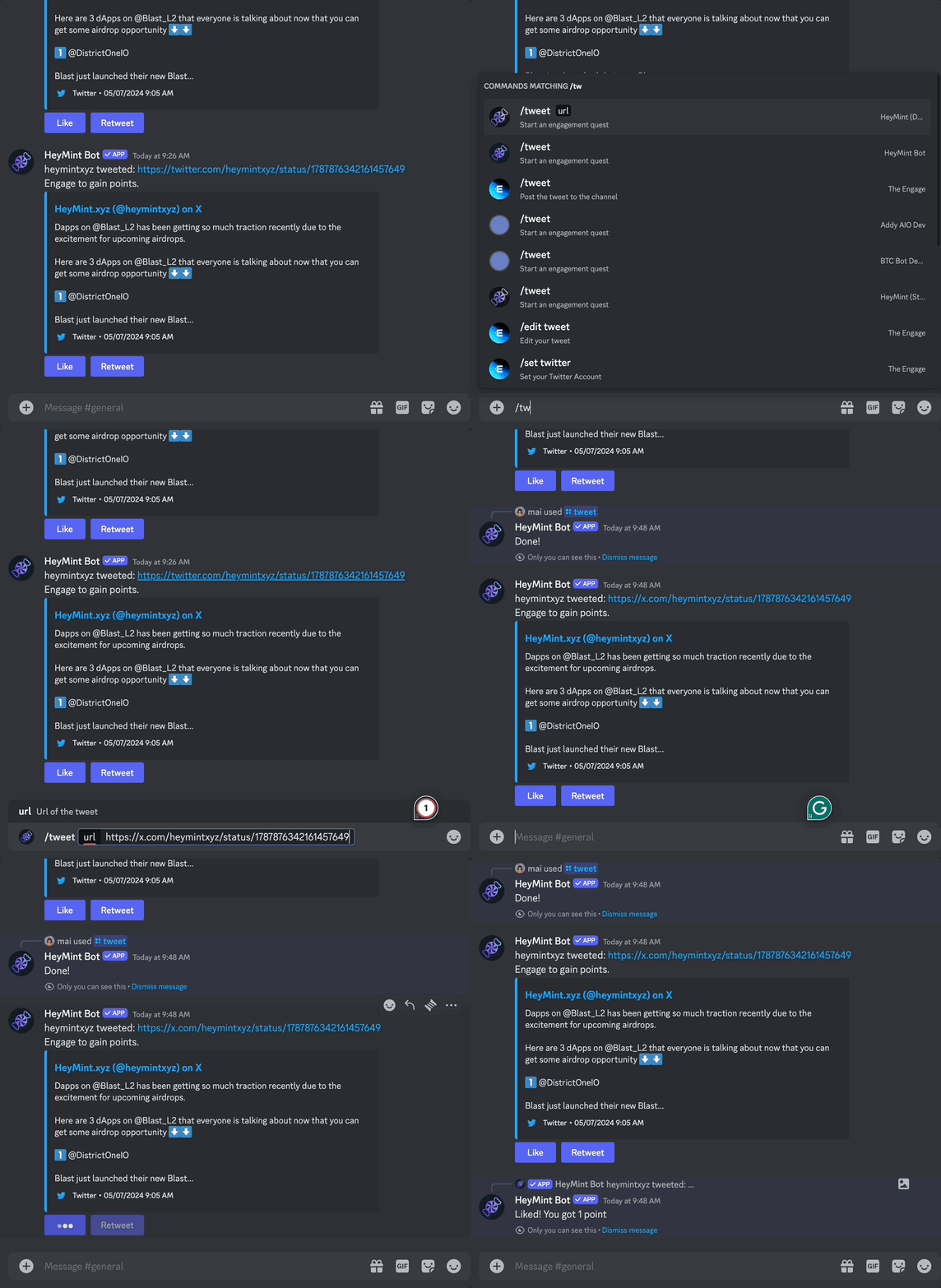
We bridge the gap between Discord and Twitter (or X), allowing your members to directly engage with your tweets – right from the comfort of your server! By giving your tweets a thumbs up or a retweet, community members will earn points and help boost your social media engagements!

<figure><img src="https://538078840-files.gitbook.io/~/files/v0/b/gitbook-x-prod.appspot.com/o/spaces%2FnvqLUUmCa9WvNAly8MkZ%2Fuploads%2FgohtEWCKnxf8mleEkVPk%2FMay-09-2024-09-48-59.gif?alt=media&amp;token=b6b7f174-65d1-4769-93fe-074655af1a2a" alt=""><figcaption></figcaption></figure>

### Here's how to start integrating Engagement Quests in your Discord Server:

#### Step 1: Add a Discord Requirement

<figure><img src="https://538078840-files.gitbook.io/~/files/v0/b/gitbook-x-prod.appspot.com/o/spaces%2FnvqLUUmCa9WvNAly8MkZ%2Fuploads%2Ft3wkNz1L0jq5OYnh0eJ0%2FScreenshot%202024-05-11%20at%2010.11.34%E2%80%AFAM.png?alt=media&amp;token=74606512-eca7-4f2a-92ff-5d30eea14e0e" alt=""><figcaption></figcaption></figure>

<figure><img src="https://538078840-files.gitbook.io/~/files/v0/b/gitbook-x-prod.appspot.com/o/spaces%2FnvqLUUmCa9WvNAly8MkZ%2Fuploads%2FHdz08g6fRB2YeFB37AWu%2FScreenshot%202024-05-11%20at%2010.12.42%E2%80%AFAM.png?alt=media&amp;token=4871abf5-eaca-4938-8728-9cc284ee5b6f" alt=""><figcaption></figcaption></figure>

#### Step 2: Invite HeyMint Bot to your server.

<figure><img src="https://538078840-files.gitbook.io/~/files/v0/b/gitbook-x-prod.appspot.com/o/spaces%2FnvqLUUmCa9WvNAly8MkZ%2Fuploads%2FYzfWzOVdGNIM5xBA9ruj%2FScreenshot%202024-05-11%20at%2010.13.36%E2%80%AFAM.png?alt=media&amp;token=a3ced639-29f7-4d4e-891a-f98a6cbfbdd1" alt=""><figcaption></figcaption></figure>

#### Step 3: Allow HeyMint Bot access to your server

<figure><img src="https://538078840-files.gitbook.io/~/files/v0/b/gitbook-x-prod.appspot.com/o/spaces%2FnvqLUUmCa9WvNAly8MkZ%2Fuploads%2FC6QzSuBkf0M7XFek0T6b%2FScreenshot%202024-05-11%20at%2010.14.35%E2%80%AFAM.png?alt=media&amp;token=59d63470-6deb-4c10-97d2-d5639de9328f" alt=""><figcaption></figcaption></figure>

#### Step 4: Authorize and Grant Permissions.

<figure><img src="https://538078840-files.gitbook.io/~/files/v0/b/gitbook-x-prod.appspot.com/o/spaces%2FnvqLUUmCa9WvNAly8MkZ%2Fuploads%2Ffm1l33LiTt6WOJghV6Vx%2FScreenshot%202024-05-11%20at%2010.16.03%E2%80%AFAM.png?alt=media&amp;token=d3c2b756-1c56-4965-8bcf-78a413936bb1" alt=""><figcaption></figcaption></figure>

#### Step 5: Return to your Discord Server and use the `/tweet` command followed by the tweet URL to start community engagement quests! &#x20;

<figure><img src="https://538078840-files.gitbook.io/~/files/v0/b/gitbook-x-prod.appspot.com/o/spaces%2FnvqLUUmCa9WvNAly8MkZ%2Fuploads%2FgohtEWCKnxf8mleEkVPk%2FMay-09-2024-09-48-59.gif?alt=media&amp;token=b6b7f174-65d1-4769-93fe-074655af1a2a" alt=""><figcaption></figcaption></figure>


# Seamless Giveaways

Our Discord bot is designed to streamline the process of running giveaways directly within a Discord server. This functionality ensures that setting up, managing, and participating in giveaways is effortless and efficient for both administrators and participants.

<figure><img src="https://538078840-files.gitbook.io/~/files/v0/b/gitbook-x-prod.appspot.com/o/spaces%2FnvqLUUmCa9WvNAly8MkZ%2Fuploads%2Fnox3or8ftNIJpopwdtor%2FMay-09-2024-10-10-26.gif?alt=media&amp;token=b53c9e4f-8af2-40de-8003-563786b330af" alt=""><figcaption></figcaption></figure>


# Step-by-Step Guide to Setting Up a Raffle on Heymint Allowlist Manager

1. Set up your allowlist raffle using our [allowlist manager](https://heymint.xyz/creator/projects/new).

<figure><img src="https://538078840-files.gitbook.io/~/files/v0/b/gitbook-x-prod.appspot.com/o/spaces%2FnvqLUUmCa9WvNAly8MkZ%2Fuploads%2FjbDPujG4Jhd8DjogAtlY%2F1.png?alt=media&amp;token=e4e82355-ee3a-4ab2-9d2e-b88e80148e54" alt=""><figcaption></figcaption></figure>

* Fill in all the required information under Project Settings for your allowlist/giveaway.&#x20;

2. **Proceed to discord tab and connect your desired server under the integration tab**

<figure><img src="https://538078840-files.gitbook.io/~/files/v0/b/gitbook-x-prod.appspot.com/o/spaces%2FnvqLUUmCa9WvNAly8MkZ%2Fuploads%2F6Jpz4PDk3ZYOQTTCMerb%2F2.png?alt=media&amp;token=0dd0b0a3-19c4-4527-b79d-e6be9cb3e0e6" alt=""><figcaption></figcaption></figure>

3. **Choose or make the role you want to assign to giveaways winners (optional)**

<figure><img src="https://538078840-files.gitbook.io/~/files/v0/b/gitbook-x-prod.appspot.com/o/spaces%2FnvqLUUmCa9WvNAly8MkZ%2Fuploads%2FI0AJY8bG3wcEkp0ga0RY%2F3.png?alt=media&amp;token=4fbd22fe-e4d2-4680-b29c-9b6cb9130c0a" alt=""><figcaption></figcaption></figure>

* if the Heymint bot is not yet invited in your server, there will be a <mark style="color:red;">red reminder</mark> that will appear.

<figure><img src="https://538078840-files.gitbook.io/~/files/v0/b/gitbook-x-prod.appspot.com/o/spaces%2FnvqLUUmCa9WvNAly8MkZ%2Fuploads%2Fs53FsFdySqO2itrPfj30%2F9.png?alt=media&amp;token=d9fa3626-3b20-42cf-9b1d-2563a739ad50" alt=""><figcaption></figcaption></figure>

* click on "here" to proceed to invite and authorize the bot in your server

<figure><img src="https://538078840-files.gitbook.io/~/files/v0/b/gitbook-x-prod.appspot.com/o/spaces%2FnvqLUUmCa9WvNAly8MkZ%2Fuploads%2Fq7rSj18g3qwTbrgf9xhb%2F4.png?alt=media&amp;token=b2769ab3-dceb-4513-8bf0-371cda63bf5a" alt=""><figcaption></figcaption></figure>

<figure><img src="https://538078840-files.gitbook.io/~/files/v0/b/gitbook-x-prod.appspot.com/o/spaces%2FnvqLUUmCa9WvNAly8MkZ%2Fuploads%2FKNt6LnHO8K1xfjX1I9de%2F5.png?alt=media&amp;token=af73e082-0ed8-4680-8dbf-8d3c08bbe775" alt=""><figcaption></figcaption></figure>

* Click save once you're done.

4. **Proceed to announcement tab to announce your raffle to your discord channel.**

<figure><img src="https://538078840-files.gitbook.io/~/files/v0/b/gitbook-x-prod.appspot.com/o/spaces%2FnvqLUUmCa9WvNAly8MkZ%2Fuploads%2F08Ai5m9v9Eex4T242OcX%2F7.png?alt=media&amp;token=630cff82-dd20-4116-aab5-f54a4363c833" alt=""><figcaption></figcaption></figure>

* set up all the needed information then proceed and click the Announce on Discord button

<figure><img src="https://538078840-files.gitbook.io/~/files/v0/b/gitbook-x-prod.appspot.com/o/spaces%2FnvqLUUmCa9WvNAly8MkZ%2Fuploads%2FRUH53FAbVgULTA1zHXeC%2F8.png?alt=media&amp;token=2321a1d9-0d6b-463c-a6cd-60244ce255fd" alt=""><figcaption></figcaption></figure>

* this is how it looks like on discord

<figure><img src="https://538078840-files.gitbook.io/~/files/v0/b/gitbook-x-prod.appspot.com/o/spaces%2FnvqLUUmCa9WvNAly8MkZ%2Fuploads%2Fzy3uzEjgcVQB37kZKdAN%2F11.png?alt=media&amp;token=fd1876c0-4a76-42ba-9a6a-eb4e9901bd94" alt=""><figcaption></figcaption></figure>

* Participants will simply click enter raffle
* connect their desired participating wallet
*

```
<figure><img src="/files/Qxhco4NU91tiE58pAKg9" alt=""><figcaption></figcaption></figure>
```

* then that's it, they already have an entry

<figure><img src="https://538078840-files.gitbook.io/~/files/v0/b/gitbook-x-prod.appspot.com/o/spaces%2FnvqLUUmCa9WvNAly8MkZ%2Fuploads%2FXUDgNPhxhISiYLeUIfe7%2F13.png?alt=media&amp;token=29fea421-0543-4fba-af9c-644db5c20998" alt=""><figcaption></figcaption></figure>


# Step-by-Step Guide to Setting Up a Raffle on Discord

**1. Go to the Giveaway Channel**

**2. Initiate the Raffle Setup**

<figure><img src="https://538078840-files.gitbook.io/~/files/v0/b/gitbook-x-prod.appspot.com/o/spaces%2FnvqLUUmCa9WvNAly8MkZ%2Fuploads%2FROx5RcQVhcZ707ML7C6e%2F1.png?alt=media&amp;token=c932c391-394a-47a1-80e3-9dea882af894" alt="" width="563"><figcaption></figcaption></figure>

* Type the command `/raffle` to start setting up a raffle.
* This will bring up a command with various options.

**3. Provide a Description for the Raffle**

<figure><img src="https://538078840-files.gitbook.io/~/files/v0/b/gitbook-x-prod.appspot.com/o/spaces%2FnvqLUUmCa9WvNAly8MkZ%2Fuploads%2FKWfU8b2gHW5EnaOYFOJy%2F2.png?alt=media&amp;token=c7c3b836-36b6-4099-a89b-eb1cc7cf1a28" alt=""><figcaption></figcaption></figure>

* Use the `description` option to provide details about the raffle.

**4. Set the Duration of the Raffle**

<figure><img src="https://538078840-files.gitbook.io/~/files/v0/b/gitbook-x-prod.appspot.com/o/spaces%2FnvqLUUmCa9WvNAly8MkZ%2Fuploads%2Fqe17eTqQ0zPJtzPOG8fv%2F3.png?alt=media&amp;token=6132daea-1050-45ca-9279-97ec9c8f7dbd" alt=""><figcaption></figcaption></figure>

* Set how long the raffle will run using the `duration` option.
* You can choose from various options, such as `30 sec`, `1 min`, `5 min`, `30 min`, `1 hr`, `2 hr`, `4 hr`, `12 hr`, `1 day`, `2 days`, `3 days`, `7 days`.

<figure><img src="https://538078840-files.gitbook.io/~/files/v0/b/gitbook-x-prod.appspot.com/o/spaces%2FnvqLUUmCa9WvNAly8MkZ%2Fuploads%2FTo6JFhqQCcKWPzS0bSzV%2F4.png?alt=media&amp;token=5847ffff-b278-4f98-9728-b8f70056fc1d" alt=""><figcaption></figcaption></figure>

**5. Specify the Entry Cost**

<figure><img src="https://538078840-files.gitbook.io/~/files/v0/b/gitbook-x-prod.appspot.com/o/spaces%2FnvqLUUmCa9WvNAly8MkZ%2Fuploads%2FYXE6Q6usmVItu7regFRz%2F5.png?alt=media&amp;token=b7cd7c30-6046-45f7-a184-beac3da3708e" alt=""><figcaption></figcaption></figure>

* Set the cost for entering the raffle using the `cost` option.
* This is the number of points or tokens required to buy a ticket.

**6. Set the Number of Winners**

<figure><img src="https://538078840-files.gitbook.io/~/files/v0/b/gitbook-x-prod.appspot.com/o/spaces%2FnvqLUUmCa9WvNAly8MkZ%2Fuploads%2Fmd2qCpTUbf4v66bXEwld%2F6.png?alt=media&amp;token=82e41fb2-0927-4a5b-a073-8986bd834d0b" alt=""><figcaption></figcaption></figure>

* Specify the number of winners using the `winners` option.

**7. Upload an Image for the Raffle**

<figure><img src="https://538078840-files.gitbook.io/~/files/v0/b/gitbook-x-prod.appspot.com/o/spaces%2FnvqLUUmCa9WvNAly8MkZ%2Fuploads%2FYyD3VkrkRSwv6urChfHu%2F7.png?alt=media&amp;token=afa2f5eb-0654-4da6-9907-963bdef5cee2" alt=""><figcaption></figcaption></figure>

* Provide an image that will be shown in the raffle announcement.

**8. Review and Confirm the Raffle Setup**

* Once all options are set, review the command in the input box.

**9. Finalize and Announce the Raffle**

<figure><img src="https://538078840-files.gitbook.io/~/files/v0/b/gitbook-x-prod.appspot.com/o/spaces%2FnvqLUUmCa9WvNAly8MkZ%2Fuploads%2FwBRd1HhbApOhujtNsjYE%2F8.png?alt=media&amp;token=92d496a5-9c58-4607-bb16-d771c598c514" alt=""><figcaption></figcaption></figure>

* Execute the command by pressing Enter.
* The bot will post the raffle details&#x20;


# Integrated Token Gating

Streamline your token-gating needs with our unified solution. With HeyMint, users authenticate just once, making access smoother and enhancing security.

Moreover, if you are an owner of multiple servers and communities on Discord, you can manage all the token gating under your administration within the HeyMint bot, simplifying the process across your platforms.

<figure><img src="https://538078840-files.gitbook.io/~/files/v0/b/gitbook-x-prod.appspot.com/o/spaces%2FnvqLUUmCa9WvNAly8MkZ%2Fuploads%2FUZJBfQrqasuLgRhc57qy%2FInvite%20Bot%20to%20Server.png?alt=media&amp;token=74ac65f1-01ea-48f2-86bd-ef361bd728ca" alt="" width="563"><figcaption></figcaption></figure>

1. **Community**: Allows you to select and manage different community settings.
2. **Settings**: This section includes configurations for Discord Severs and Add Team Members.
   * **Select Your Server**: This section allows you to link HeyMint Bot to one of your servers where you have admin privileges. It facilitates the integration of the Bot with your chosen community.
   * **Connected Server**:
     * **Bot status**: Indicates whether the HeyMint bot is active on your server. A red status means the bot is not active.
     * **Invite the bot to your server**: This button lets you invite the HeyMint bot to join your server, enabling its functionalities there.
     * **Your servers**: Displays the servers under your administration.&#x20;
3. **Role Verification**:&#x20;

   Users associated with **Ordinals, BRC-20, and EVM NFT** can be seamlessly verified within your community through the use of the HeyMint Bot. This solution ensures that even in the presence of diverse blockchain technologies among community members, there is no necessity for multiple verification systems. The HeyMint Bot is capable of efficiently handling user verifications across all supported blockchain platforms, simplifying the management process.<br>


# Ordinals

Ordinals are means of creating Bitcoin NFTs by attaching data such as images, videos, and more to an individual satoshi on the base Bitcoin blockchain.

If you have an Ordinals collection, our HeyMint bot's token gating feature can be used to verify your holders.<br>

1. **From the left panel, proceed to Ordinals under Role Verification and click&#x20;**<mark style="color:purple;">**+Add new role**</mark>**&#x20;button**
2. **Identify the specific source of collection associated with your community and Select the rule to assign roles.**

<figure><img src="https://538078840-files.gitbook.io/~/files/v0/b/gitbook-x-prod.appspot.com/o/spaces%2FnvqLUUmCa9WvNAly8MkZ%2Fuploads%2FU2XFdQbt8tereFOHWqyS%2FAdd%20New%20Role.png?alt=media&amp;token=93da3bc2-c47e-45d3-8a66-d80a3e2d7315" alt="" width="563"><figcaption></figcaption></figure>

* **Simple token ownership**: This rule assigns roles based on the possession of one or more tokens from the specified collection. It's marked as the most popular choice for its straightforward approach.
* **Inscription # based ownership**: This advanced rule allows you to assign roles based on ownership of tokens with specific inscription numbers or a range of numbers.
* **Trait based ownership**: Another advanced option, this rule assigns roles based on specific traits possessed by the tokens, enabling more granular control over role assignment.

{% hint style="info" %}
After setting up your collection and defining the rules, you can continue to finalize the role verification setup.
{% endhint %}

#### **2. Specify the Collection that you wanted to token gate.**

### **Magic Eden**

You can find your collection by searching for its symbol on Magic Eden, a popular marketplace.

<figure><img src="https://538078840-files.gitbook.io/~/files/v0/b/gitbook-x-prod.appspot.com/o/spaces%2FnvqLUUmCa9WvNAly8MkZ%2Fuploads%2FEVHivfkw7tp8Pf6MCx7s%2FMagic%20Eden%20.png?alt=media&amp;token=35115ca1-01c2-497f-8613-f8ab6c8449a6" alt="" width="366"><figcaption></figcaption></figure>

* click <mark style="color:purple;">Add role to</mark> finish.

### **Inscription range**

&#x20;If your collection is not listed on Magic Eden, you can manually specify an inscription range for the tokens.

<figure><img src="https://538078840-files.gitbook.io/~/files/v0/b/gitbook-x-prod.appspot.com/o/spaces%2FnvqLUUmCa9WvNAly8MkZ%2Fuploads%2F9svCPkYgPCQxenJZmKJY%2FInscription.png?alt=media&amp;token=b3c45c3d-a39d-4452-8c71-023356923b5d" alt="" width="372"><figcaption></figcaption></figure>

* click <mark style="color:purple;">Save role</mark> to finish .

{% hint style="info" %}
Prior to saving, ensure that you set HeyMint bot permission to 'Manage Roles' and position its role above the selected role in your server's role hierarchy.
{% endhint %}

# BRC-20

BRC-20 is an experimental token standard that enables the minting and transferring of fungible tokens on the bitcoin blockchain. It stands for Bitcoin Request for Comment and is similar to the ERC-20

If you have a BRC-20 token project, HeyMint Bot's token gating feature can also be used to verify your holders.

* to add a BRC-20 role verification, from the left panel click on BRC-20 under Role Verification.
* Click on <mark style="color:purple;">+ Add new role</mark>

<figure><img src="https://538078840-files.gitbook.io/~/files/v0/b/gitbook-x-prod.appspot.com/o/spaces%2FnvqLUUmCa9WvNAly8MkZ%2Fuploads%2FBWClBBoVhAqWI8DDSyqO%2F1.png?alt=media&amp;token=4c0fdfa8-8633-46cd-bff7-65c6bdea3232" alt=""><figcaption></figcaption></figure>

* Fill in the necessary information then click <mark style="color:purple;">Add Role</mark> to finish.

<figure><img src="https://538078840-files.gitbook.io/~/files/v0/b/gitbook-x-prod.appspot.com/o/spaces%2FnvqLUUmCa9WvNAly8MkZ%2Fuploads%2FmHI3qLR8KwTj5mbhHFSb%2F2.png?alt=media&amp;token=f8ecba4c-a7ed-44fa-81c7-7396a4a8c76e" alt=""><figcaption></figcaption></figure>


# EVM NFT

The Ethereum Virtual Machine (EVM)NFTs are NFTs that are used in DeFi applications like games and other interactive activities.

If you have a EVM NFT project, HeyMint Bot's token gating feature can also be used to verify your holders.

1. **From the left panel, proceed to EVM NFT under Role Verification and click&#x20;**<mark style="color:purple;">**+Add new role**</mark>**&#x20;button.**

<figure><img src="https://538078840-files.gitbook.io/~/files/v0/b/gitbook-x-prod.appspot.com/o/spaces%2FnvqLUUmCa9WvNAly8MkZ%2Fuploads%2Ff4rl7BkqLPYNAx24iNMY%2F1.png?alt=media&amp;token=38f31cfe-bb82-4f2e-b0b0-5d429a7b3e50" alt=""><figcaption></figcaption></figure>

2. **Identify the specific source of collection associated with your community and Select the rule to assign roles.**

<figure><img src="https://538078840-files.gitbook.io/~/files/v0/b/gitbook-x-prod.appspot.com/o/spaces%2FnvqLUUmCa9WvNAly8MkZ%2Fuploads%2FFTKARh5BX9YclhG6YxLh%2F2.png?alt=media&amp;token=933843a0-a971-4644-8fb8-28dc553811d8" alt=""><figcaption></figcaption></figure>

<figure><img src="https://538078840-files.gitbook.io/~/files/v0/b/gitbook-x-prod.appspot.com/o/spaces%2FnvqLUUmCa9WvNAly8MkZ%2Fuploads%2FT2xLUmtKKDaxgDcPXgaQ%2F3.png?alt=media&amp;token=b8964545-790c-4c54-b02d-c0cf698ca1df" alt=""><figcaption></figcaption></figure>

* **Simple token ownership**: This rule assigns roles based on the possession of one or more tokens from the specified collection. It's marked as the most popular choice for its straightforward approach.
* **Trait based ownership**: Another advanced option, this rule assigns roles based on specific traits possessed by the tokens, enabling more granular control over role assignment.

{% hint style="info" %}
After setting up your collection and defining the rules, you can continue to finalize the role verification setup.
{% endhint %}

#### **2. Specify the Collection that you wanted to token gate.**

### **Opensea**

You can find your collection by searching for its symbol on Opensea, a popular marketplace.

<figure><img src="https://538078840-files.gitbook.io/~/files/v0/b/gitbook-x-prod.appspot.com/o/spaces%2FnvqLUUmCa9WvNAly8MkZ%2Fuploads%2FVnpbY6w07rHJKVfzsTDV%2F4.png?alt=media&amp;token=f3f364fe-512a-4778-81e6-2e10c6e00bcd" alt=""><figcaption></figcaption></figure>

<figure><img src="https://538078840-files.gitbook.io/~/files/v0/b/gitbook-x-prod.appspot.com/o/spaces%2FnvqLUUmCa9WvNAly8MkZ%2Fuploads%2FOfgUGUag1qrQk6WX1gbp%2F5.png?alt=media&amp;token=add662ca-2ae1-4ab6-9ecc-4d986794e445" alt=""><figcaption></figcaption></figure>

* click <mark style="color:purple;">Add role to</mark> finish.

### **Manual Entry**

&#x20;If your collection is not listed on Opensea, you can manually specify the Token's contract address.

<figure><img src="https://538078840-files.gitbook.io/~/files/v0/b/gitbook-x-prod.appspot.com/o/spaces%2FnvqLUUmCa9WvNAly8MkZ%2Fuploads%2FOGba82yIoD3cg2Q28PyB%2F6.png?alt=media&amp;token=07dcab23-3263-4904-b8ec-bf8d7803de07" alt=""><figcaption></figcaption></figure>

* click <mark style="color:purple;">Add role</mark> to finish .

{% hint style="info" %}
Prior to saving, ensure that you set HeyMint bot permission to 'Manage Roles' and position its role above the selected role in your server's role hierarchy.
{% endhint %}